Strum check
Strum all the open strings once. Every string shows at the same time which way to turn it. A quick check first, then you tune the strings that are off one by one.
Check every string at once
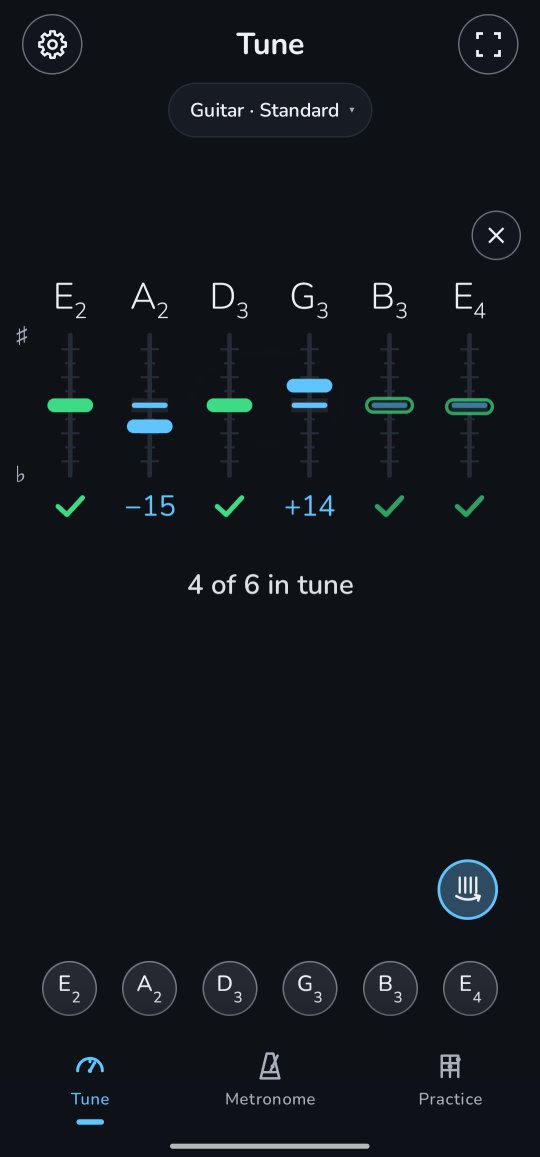
- On the tuner, tap the strum button above the strings' buttons, at the right. In the lens's place a column stands for every string, in the same order as the strings' buttons below, and under it it says Strum all the open strings.
- Strum all the open strings, without pressing any, and let them ring.
- After about half a second each column shows its string: a marker on a short scale, up for sharp and down for flat, and under it the cents off (−20, +15), a check mark for a string in tune, or a dash when Twangle didn't hear it.
- Under the columns it says how many are in tune, for example 4 of 6 in tune, or All strings in tune.
Then tune the ones that are off
Once the strum has rung out, the strum button turns itself off and the tuner is back to one string at a time, inside the columns. Just play a string that is off and tune it: its column's marker moves as you turn the peg, the word says which way, and once the string is in tune it gets its check mark and the count goes up, 5 of 6 in tune. The other columns keep the strum's reading until you have tuned them too, so you always see which strings are left.
Tap the button and strum again any time to check the whole instrument once more. The small × above the columns, or Back, brings the tuner's own lens back.
Good to know
- Strum firmly and let the strings ring: the first, loud moment of a strum counts most.
- A hollow, paler marker is less sure. In standard tuning that is often the B and the high E: their notes overlap with the low E's harmonics, so Twangle can't hear them as clearly. If one looks off, play it on its own: its column follows the tuner. While any string is less sure, the line under the count says so: Pluck the pale strings on their own.
- A strum counts a string as in tune by the same rule as the tuner: within 5 cents, or 2 when Settings → Precise tuning is on.
- Without the button the tuner reads one string at a time, also when you strum. If too few strings rang in the strum, nothing shows and the button stays on: strum again. Tap it once more to turn it off.
- The columns go after half a minute without a sound, and when you pick another tuning.
- It works with your tuning, whatever it is, on every instrument but the 12-string guitar (its twelve strings ring too close together to tell apart), with the instrument's strings: not in Any note.
For the curious: hearing six strings at once
Why a button? Guessing from the sound alone whether you played one string, a strum or a chord turned out to be unreliable: a chord of mostly open strings, or a string plucked while others still ring, sounds a lot like a strum. With the button you tell Twangle a strum comes, so it reads the next sudden sound as one.
A single string is easy: its wave repeats, and the time it takes gives the note. In a strum all the waves are on top of each other. But a string's sound is more than one note: it is a row of harmonics at one, two, three, four times its pitch. Twangle knows which strings your tuning has, so for each string it looks in the sound's spectrum for that row of harmonics near where the string should be, and measures exactly where they are. It does this on about a third of a second of sound, ten times a second while the strings ring, and weighs the readings by how loud they were.
Some harmonics of different strings land on almost the same pitch. In standard tuning the B string is almost exactly three times the low E's pitch, and the high E four times, so every harmonic of theirs is also one of the low E's. Where two strings share a harmonic, Twangle leans on the ones that don't, and when none are left, it reads the shared one and marks the string less sure.