Chords
Chord charts for the instrument and tuning you play: twenty chord types on every root, with up to six ways to play each one, the easiest first. In Drop D, DADGAD or a tuning of your own, the charts are worked out for that tuning.
Find a chord
- Tap the Practice tab, then the Chords card. The tabs stay at the bottom; the arrow at the top left, or a tap on Practice, leads back to the cards.
- At the top stands Chords, with your instrument and tuning under it, for example Guitar · Standard. Tap it to pick another; the tuner follows.
- Tap the chord's name, the wide button under it, and pick a Root (the twelve notes) and a Chord type. The chart changes as you pick.
- Swipe across the chart, or tap ‹ and ›, for the other shapes: 2 of 6.
Reading the chart
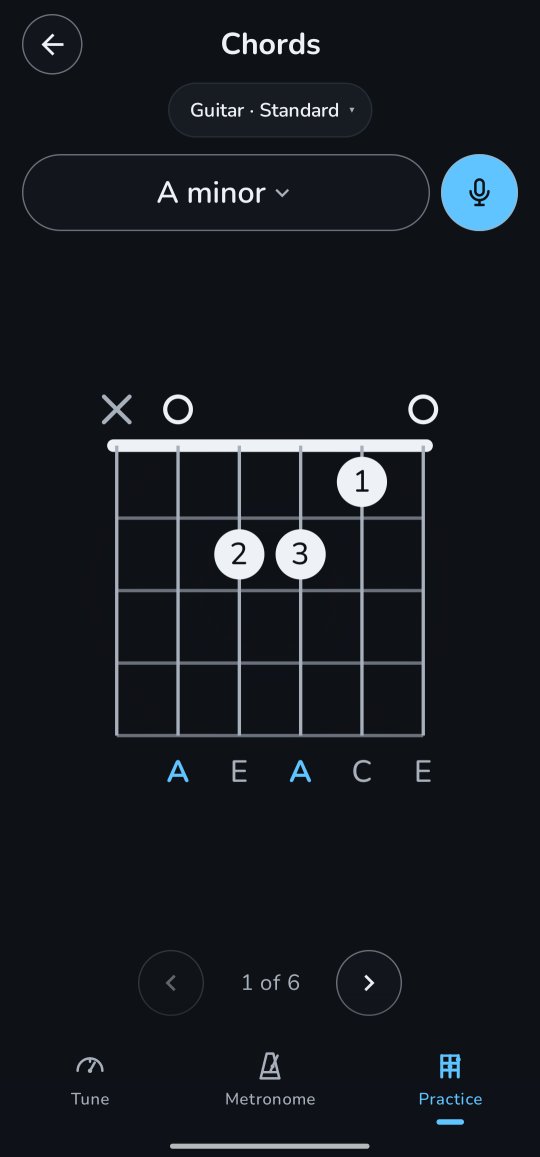
The chart is the neck standing up, as in a songbook: the strings run top to bottom, the lowest on the left, and the thick line at the top is the nut. A shape higher up the neck has no nut but 5fr beside its first row: that row is the 5th fret.
- o over a string: play it open. ×: don't play it.
- A dot is where a finger goes, with its number: 1 the index finger, 2 the middle, 3 the ring, 4 the little finger.
- A bar across several strings is a barre: one finger, usually the index, presses them all.
- Under the strings are the notes they sound; the chord's root is in colour.
The chord types
On a C they are: C, Cm, C5 (the power chord), C7; Cmaj7, Cm7, Csus2, Csus4; C7sus4, C6, Cm6, Cadd9; C9, Cm9, Cmaj9, C7♯9; Cdim, Cdim7, Cm7♭5 and Caug. The button above the chart says the chord's name in words, C major seventh.
Good to know
- Every shape is found for your tuning, a lowered one or your own included, and fits in a stretch of four frets anywhere up to the 12th. When a chord has none, the chart says No shape within reach in this tuning.
- On the ukulele and the mandolin every shape uses all four strings, as their chord books do.
- Playing left-handed? Settings → Left-handed draws the charts the other way round. See Left-handed.
- Notes are written the way you set in Settings → Note names.
- The root you pick here is the root in Scales too, so you can go from a chord to its scale and back.
- On the 5-string banjo the chart shows frets 1 to 5, so you see where the short string starts: at its own small nut by the 5th fret, with its peg beside it, and its o or × just above. On a chart higher up the neck its nut stays by the 5th fret, so from the 7th fret up it runs the whole way, as the other strings do. Its g rings open only where it belongs to the chord; otherwise it is pressed higher up or not played.
- With TalkBack, the chart is read string by string, from the thickest: A 2 string, fret 3, finger 3, C. The banjo's fifth is the short G 4 string.
For the curious: where the shapes come from
The charts aren't a list typed in: Twangle works them out for the tuning you play. It tries every string muted, open, or pressed within four frets, and keeps the shapes that sound every note of the chord and no other (a 6th, 7th or 9th chord may leave out its fifth, as guitarists do). Strings are only left out on the thick side, so the chord can be strummed, and on five strings or more the lowest note is the chord's root.
Then it ranks them by effort: each finger, a barre, a long stretch, a hand far up the neck and a string left out all add a little. The weights were set so that in standard tuning the shapes chord books show first come first: C is the open x32010 before the barre at the 3rd fret.